

Forum Replies Created
Field 2:
Field 3:
-
AuthorPosts
-
Master Toby Milroy
KeymasterWe’re actually working on an all new “agreement form” that works much like what you’re describing.
Integrating it to the ProShop is also on the roadmap for that feature.
I’ll keep you in the loop on where we are with that!
Thanks!
KeymasterYeah…that’s a good suggestion.
We’re looking at a more consolidated task list widget. I think it’s the type of thing you’re looking for.
I’ll keep you in the loop on where we are with it’s development.
Thanks!
KeymasterWe might have to have you look at this with one of the team.
When you click the “Prospect” widget in the Dashboard, you’re taken to a list of prospects sorted by “Date Created”….so that “should” get you what you’re looking for.
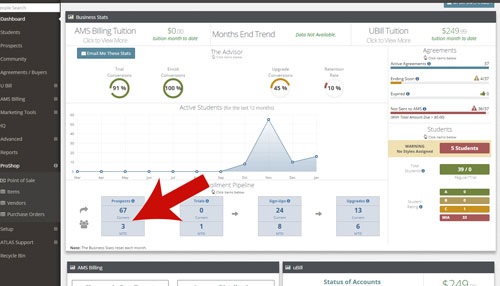
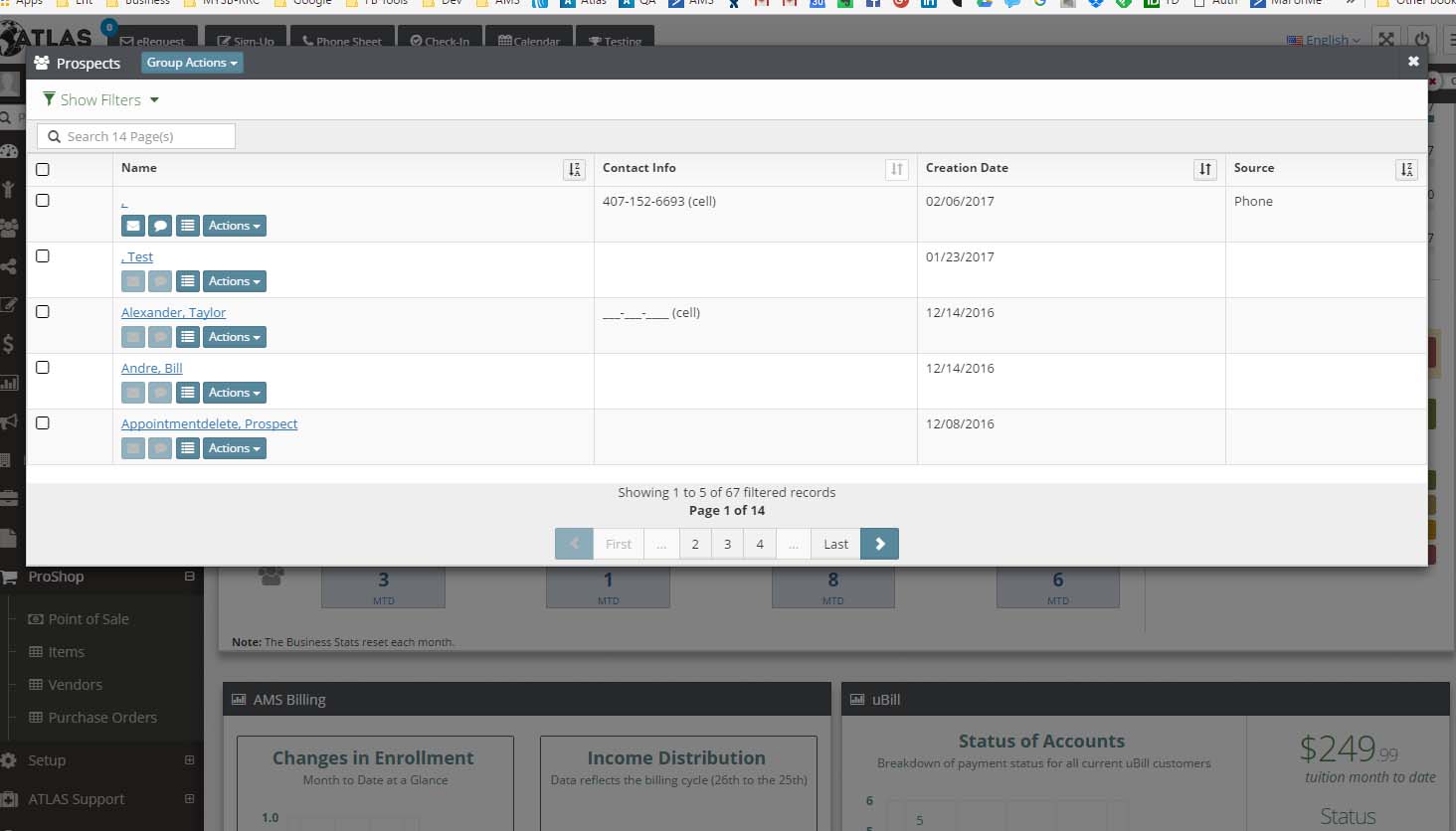
Please let me know if this is “not” what you mean…or if I’m missing something.
Thanks Mike!
-
This reply was modified 9 years, 7 months ago by
Master Toby Milroy.
KeymasterMike,
Are you suggesting adding these menu items and categories in the “POS” interface?
KeymasterI see….
We changed the size of the modals from about 500px wide to 90% of the screensize…I think that has interfered with the resize options.
We’ll take a look.
Thanks!
(Moving to Tech Support Forum)
KeymasterI see it..
Thanks!
Sent to Development.
KeymasterYeah…there is a release date in the META box, but it’s pretty small…
I’ll take a look.
Thanks!
KeymasterMike,
We have a LOT planned for this area too….
In the meantime, I have a few nice looking HTML email templates loaded onto the MABiz Academy that you might like to check out.
Go to
Marketing tools -> Ma Biz Academy -> (Category Picker) -> Autoamtion Sequences -> Automation Email Templates
There you can grab the sourcecode, and drop it into the HTML editor in ATLAS.
We’re working on a better gallery for these…..but this might help with your current needs.
Thanks!
KeymasterOk…that is interesting……new one…heh.
Let me know where that gets you.
thanks!
KeymasterYep!
Take a look at the new student “list”.
This now has all the “Columns” that you can choose, and the ability to “save” your search (INCLUDING all the filters).
We’re going to be adding columns over time as well….but I think you’ll find this is a good framework that will give you what you’re looking for.
We’ll be using this concept for “Transactions”, “Lists of all people”, and MUCH more as we move forward!
I think you’ll like it!
Let me know if you see any other columns or filters you might like to see as well.
Thanks again!KeymasterInterestingly….we’ll be rolling out a “notification” system in a few weeks.
You’ll be able to trigger notifications to you (or anyone you like) when “any” message is sent to a prospect or really “any” other automation step.
Stand by, I’ll be sure to let you know when it goes live!
KeymasterWe’re looking at where we might be able to make this layout more easy to see “more”….but it’s a bit of a 7-10 split.
More to come.
Thanks!
KeymasterOn Saturday, we’re rolling out a “transaction list”. This list will give you all the details for each transaction processed.
This might get you what you’re looking for.
Stand by.
KeymasterHey Mike!
You’re thinking the same way we are.
We’re moving to incorporate the new “list” in all the ‘people’ and ‘money’ related sections. Where you can sort and filter your lists however you like, then save that search for quick access in the future.
I think that’ll solve about 90% of all the ‘report’ related items you may want.
Are there any specific examples you can think of that might ‘not’ be solved this way?
Thanks!
KeymasterHey Mike,
This is interesting.
What most of our folks do is use the same finger for everyone, and then the thumb for small children.
Let me know if that is at all helpful.
-
This reply was modified 9 years, 7 months ago by
-
AuthorPosts