

Forum Replies Created
Field 2:
Field 3:
-
AuthorPosts
-
Master Toby Milroy
KeymasterHmmm…yes, I see what you’re saying.
The list gives us the ability to configure the results that you’re looking for…and the reports currently don’t have that ability.
For now, I’d recommend that you set up the filters to show the results you’re looking for, then go to “Group Actions” and export to Excel.
There you can pop in your logo and format as you’d like.
I’ll put in a feature request to the Dev team, and see if they can add a filter to the ‘report’ in the report section.
Thanks!
KeymasterHi Eric,
We do provide a fair few pieces of art in the BizAcademy that are pre-produced, but we don’t provide “stock art”.
The licensing structure for stock art doesn’t allow us to provide ‘raw’ stock images to our users. (Without HEAVY fees)
We are, however, expanding our Biz Academy resources, and I’ll put an item on our list to try to include more variants and perhaps more images that we own the rights to.
Thanks!
KeymasterI want my employees to be able to do some billing actions, but I don’t want them seeing our income/monthly/projections. It looks like it’s an option on the permissions checklist, but they appear to be linked together.
Hmmm….I see what you’re describing.
Currently, the “top” stat widget is ‘permissioned’ but not the Larger widget with the Forecast.
I’ll put this into the Dev Feature request list!
Great suggestion!
I can’t give you a sense of when exactly we’ll be able to add the feature, but I’ll be sure it’s on our list.
Is it also possible to create an account history report that shows only payments made? Taking away all the other stuff like adjustments, etc?
Yes!
You can use the Payment “Type” filter to show or hide whatever types of payments you’d like. Set that filter, then you can go to group actions, and print the grid. February 22, 2018 at 11:41 AM in reply to: All columns do not show on print and too much shows in fields on export #1678Keymaster
Susan,
Does this help you get what you need?
If you need more help with this, please give our team a buzz – 1-800-275-1600.
Thanks a million!
KeymasterHey Mike,
1. Can you create a “Back” button or enable the Back Arrow to return to the last View instead of the Default View?
We’re working on some ways to make navigating back to ‘where you were’ easier….it’s a sticky problem, but we are thinking about solutions.
2. Can you make a Saved View hold, so when you hit the Back Arrow it returns to the current Saved View instead of having to re-select the Saved View
I’m not sure if I follow this one. From “where” are you going back to the list?
3. Can you add a Saved Views button at the root of the People menu pick to eliminate the step of having to select a People Person Type before opening a Saved View.
Are you describing the “Left” navigation “People” item? If so, we’re thinking about making “shortcuts” there to get to your favorite lists quicker.
If you’re NOT describing the left nav, and you’re on the People List already, then you don’t have to choose a person type, you can select a saved view from there…(but I suspect you’re describing the left navigation… 😉 )
4. On a larger scale, it would be nice to have a “Saved Views” button available on all windows to allow easier navigation from anywhere.
Yeah…I think the favorite “shortcuts” on the left navigation solve this too…
We’re thinking the same way on this!
This is something we’ve discussed internally, and have on our roadmap.
Thanks for the wonderful feedback again!
You’re typically right on target Mike!
KeymasterMike,
We’re re-building an all new Comm Hub in the near future.
I’ll let you know when it rolls out!
KeymasterYeah…I see what you mean…..it might save a copy and paste, but we have many schools that need completely separate terms and conditions for different programs.
For example all the cancellation and requirement terms are totally different for an After School Program, that say, for a kickboxing program.
So you’re model would ‘break’ that use case (which is quite common for many of our clients).
Your best bet is to copy and paste the ‘entire’ T&C into each program that you want to be different than the default.
Hope that helps!
-
This reply was modified 8 years, 6 months ago by
Master Toby Milroy.
KeymasterHi Stephanie!
This feature is in QA testing as we speak.
We’ll let you know when we roll it out into ATLAS.
Thanks for the great suggestion (it has been on my list for a while 🙂 ).
KeymasterHi Sir!
We’re not able to replicate this…it appears to be working.
I’m going to close this for now, please let us know if you see this happen again!
Thanks for the feedback!
KeymasterHey Sir!
This issue is resolved.
Please let us know if you see anything else!
Thanks for the feedback!
KeymasterHey Mike,
Our team is going to be re-designing the person profile page in a future effort.
I think you’ll like the new layout, as it solves this issue.
I’m not sure when it’ll roll into production, and can’t make any promises about a timeline, but I’ll let you know when it’s ready!
-
This reply was modified 8 years, 6 months ago by
February 15, 2018 at 10:52 AM in reply to: All columns do not show on print and too much shows in fields on export #1638KeymasterSusan,
We have a new update that will remove the ‘extra’ information in the columns that you’re seeing (ie. “Show All” “Hide All” etc…).
That update is in QA testing as we speak, and I’m hoping will roll out in a couple weeks or so.
So far as “printing” the grid, depending on your printer and web font settings (etc) can be unpredictable. I was able to print 10 columns successfully, but I had to “Scale” down the print to fit the page.
Try to adjust your printer set up “Scale” when you print the grid like this:

Then Set a Scale:

Let me know if that helps!!
Thanks!
KeymasterCurrently, if you “Show All” results on the grid, using this tool:
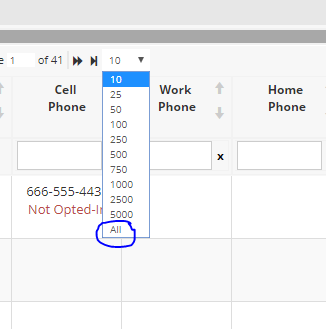
Then “Check” all the results:
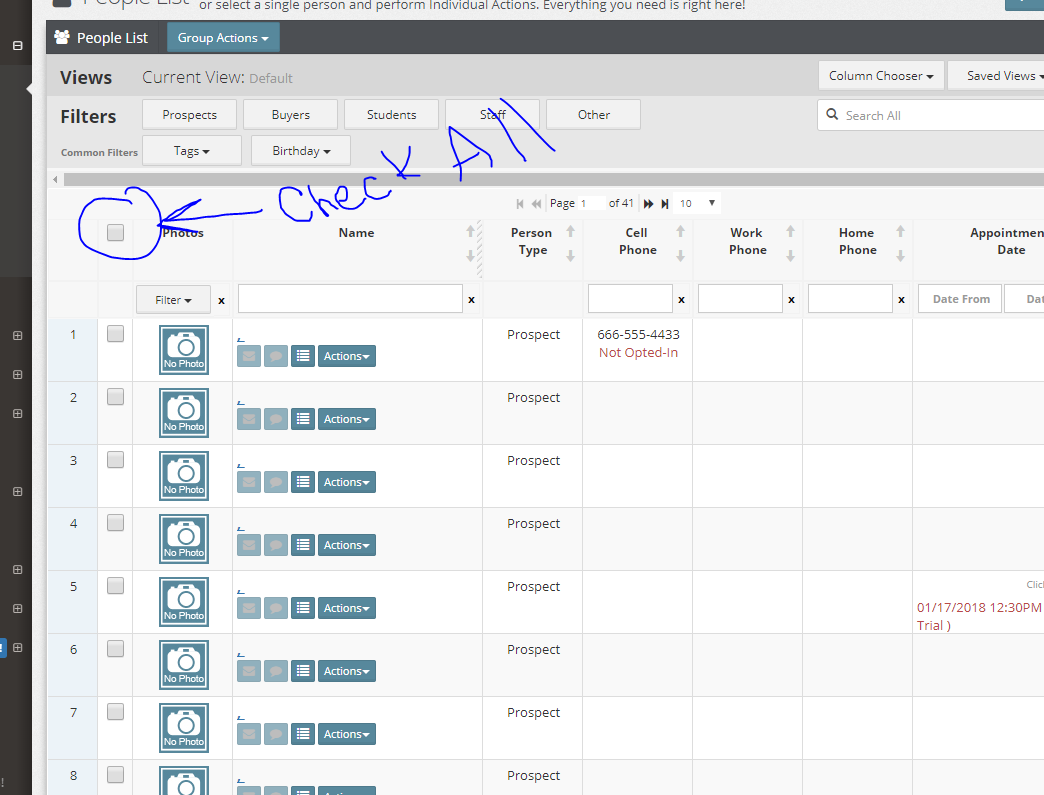
You’ll then get all the results for printing etc.
We’re also working on an even easier way to select lists like this in the future….so be on the lookout for that!
KeymasterHi Susan!
Thank you so much for your patience on this issue.
Turns out, this issue was MUCH more complex than we thought originally. When you add multiple styles to the mix, it got pretty challenging pretty quickly.
Anyway, here is a solution to the Rank “Sorting” issue:
Please let me know if you have any issues with this.
Thanks!
KeymasterHi Susan!
Thank you so much for your patience on this issue.
Turns out, this issue was MUCH more complex than we thought originally. When you add multiple styles to the mix, it got pretty challenging pretty quickly.
Anyway, here is a solution to the Rank “Sorting” issue:
Please let me know if you have any issues with this.
Thanks!
-
This reply was modified 8 years, 7 months ago by
-
This reply was modified 8 years, 6 months ago by
-
AuthorPosts