
Home › Forums › Support Forums › Technical Support – Report Issues Here › Export "ALL" Not Working
- This topic has 5 replies, 4 voices, and was last updated 8 years, 7 months ago by
Master Toby Milroy.
Field 2: Desktop/Laptop
Field 3: Win10
-
AuthorPosts
-
-
January 21, 2018 at 5:29 PM #1587
ChamblissTKD
ParticipantI tried to export “all” prospects and nothing happens. However, if I just export one page view of 10 at a time, then the export works. Had 27 prospects so I exported to three files and then merged them, but would be nice if I could select “all” and it would export all 27 records.
Thanks.
-
January 22, 2018 at 1:22 PM #1588
SFries
ParticipantI am experiencing a similar problem with exporting. I have to export because my student list will not sort by rank like it used to. Now when I export and try and sort the list myself by rank I have to delete all the other information Atlas is putting in the rank field which happens to be extra stuff ( style name, tip information, parenthesis) that is not in my rank field under school set up. Extremely time consuming.
-
January 24, 2018 at 12:14 PM #1596
Jose Rodriguez
ParticipantI apologize for the frustration this is causing both schools.
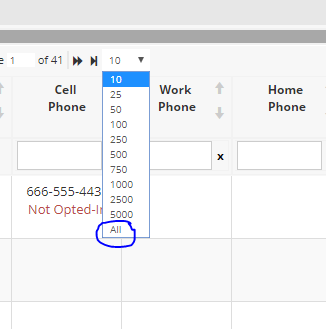
Regarding the export “all” not working. Try this, go down to the number of records selector at the bottom of the list and expand it to all. Then click the select all and then group actions > export. I think this will work for you.
Regarding the extra information in the spreadsheet. I see exactly what you are talking about and I will bring the issue to the development team.
I will have a representative reach out when there is information regarding this issue.
Again, thank you for your patience!
Sincerely,
Jose Rodriguez
-
January 24, 2018 at 3:24 PM #1598Participant
Tried your suggestion but export “all” still not working.
-
January 25, 2018 at 12:15 PM #1601Participant
I’m going to have Daniel reach out to you and walk you through the solution.
-
February 15, 2018 at 10:36 AM #1636
Master Toby Milroy
KeymasterCurrently, if you “Show All” results on the grid, using this tool:
Then “Check” all the results:
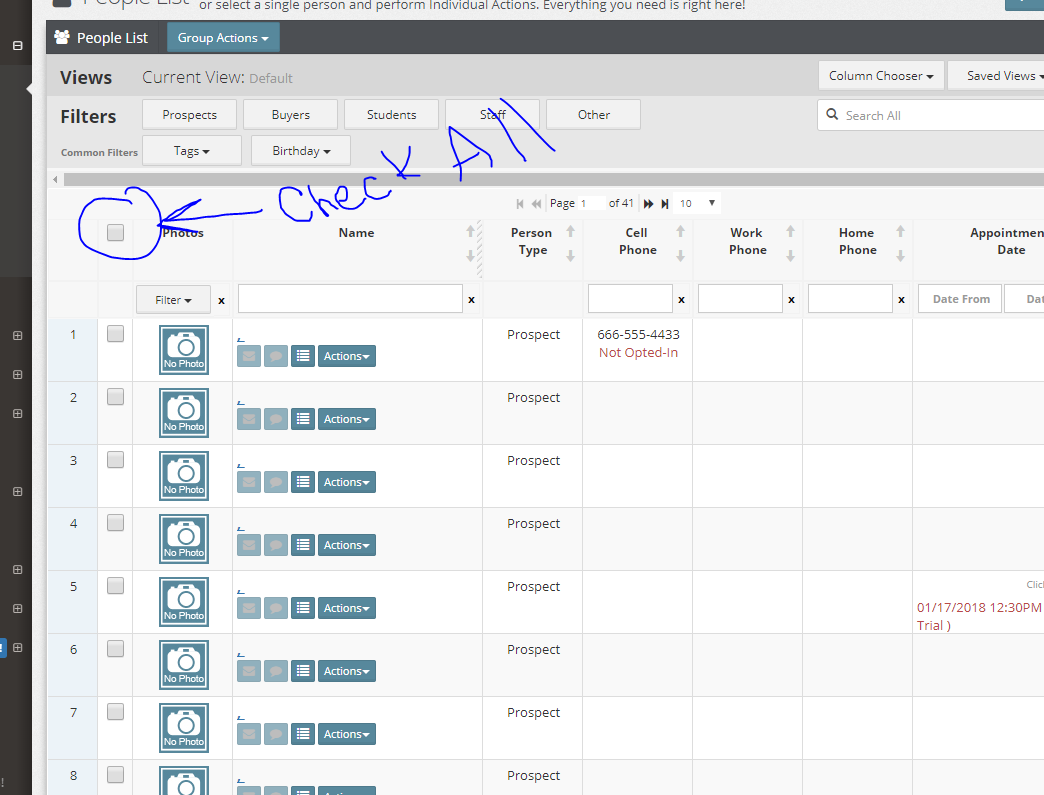
You’ll then get all the results for printing etc.
We’re also working on an even easier way to select lists like this in the future….so be on the lookout for that!
-
-
AuthorPosts
- The topic ‘Export "ALL" Not Working’ is closed to new replies.